
BRIDGE 4 — Fitbit Air → WHOOP 4.0 band adapter


BRIDGE 4 — Fitbit Air → WHOOP 4.0 band adapter
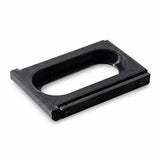
Give your WHOOP 4.0 bands a second life. BRIDGE 4 holds the Google Fitbit Air sensor and attaches to WHOOP 4.0-format bands: same sensor, new bands.
Why you'll love it
- Tool-free installation — the sensor sits in, the adapter attaches — done.
- Reuse your 4.0 bands — put them back to work with your Fitbit Air.
- Lightweight — in rigid ABS, you won't feel it on your wrist.
- 6 colors — including a clear version.
Specifications
- Direction: Google Fitbit Air sensor → WHOOP 4.0-format band
- Material: ABS
- For WHOOP 5.0 / MG bands, choose BRIDGE 5
In the box
- 1 adapter
- Sensor and band not included
Compatibility
Sensor: Google Fitbit Air.
Bands: WHOOP 4.0 format. For WHOOP 5.0 / MG bands, choose BRIDGE 5.
The adapter works one way only: it can't be used to wear a WHOOP sensor in a Fitbit Air band.
Installation
- Remove your Fitbit Air sensor from its original band.
- Place it in the opening of the BRIDGE adapter.
- Slide the assembly into the slot of your WHOOP-format band, just like a WHOOP sensor.
No tools needed. To charge, remove the sensor as usual.
Shipping & returns
Tracked shipping to Canada and the United States. The options, delivery times and costs for your address are shown at checkout, before you confirm.
30-day returns after delivery, for unworn items in their original condition and packaging. Read the return policy.
Care
Wipe the adapter with a soft, slightly damp cloth. Avoid solvents and direct heat.
A question before ordering?
Check our FAQ and compatibility guide, or write to us: we'll confirm compatibility before you buy.

For real: a Fitbit Air sensor fitted in BRIDGE, on a WHOOP-format band.
How it works
Three steps. No tools.
BRIDGE connects your Google Fitbit Air sensor to a WHOOP-format band. Here's exactly how it goes together.
- Remove the sensorTake your Fitbit Air sensor out of its original band.
- Fit it into BRIDGEThe sensor sits in the frame's opening, which keeps the sensors underneath in contact with your skin.
- Slide it into the bandThe assembly slides into the slot of a WHOOP-format band, just like a WHOOP sensor. You're done.
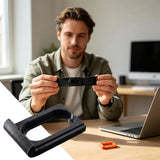
Good to know: BRIDGE works one way — Fitbit Air sensor into a WHOOP band. It can't be used to wear a WHOOP sensor in a Fitbit Air band. Sensor and band not included.
Compatibility
The right adapter for the right band.
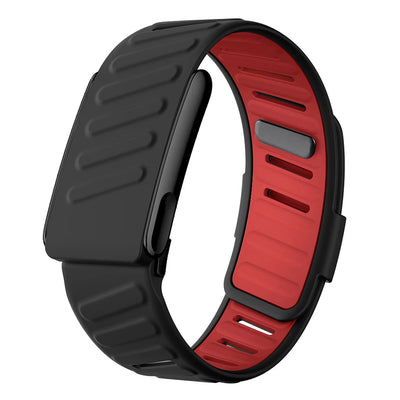
No guesswork: find your sensor in the left column and instantly see which bands fit it.
Not sure about your model? Write to us before ordering and we'll confirm compatibility.
Frequently asked questions
All about BRIDGE
The adapter is a new product: here are answers to the questions we get asked.
Does my Fitbit Air sensor work normally in the adapter?
BRIDGE is a simple mechanical frame: it doesn't modify the sensor. Its opening keeps the underside of the sensor in contact with your skin, just like a regular band.
Can I put a WHOOP sensor in a Fitbit Air band?
No. BRIDGE works one way: Google Fitbit Air sensor into a WHOOP-format band.
Which BRIDGE for which band?
BRIDGE 5 for WHOOP 5.0 / MG-format bands (like our PULSE band). BRIDGE 4 for WHOOP 4.0-format bands.
Are the band and sensor included?
No, the adapter is sold on its own. You'll need your Google Fitbit Air sensor and a matching WHOOP-format band.
How do I charge my sensor?
Remove the sensor from the adapter and charge it as usual with its original charger.
You may also like
- Tracked shipping Canada & USA
- 30-day returns After delivery
- Secure payment Encrypted via Shopify Checkout
- Have a question? We'll reply by email